这篇文章写自英文,阅读原文章.
由于本文暂未被翻译成中文,请使用下面工具选项进行翻译
Searching
Introduction
Problem (Searching)
Given: a collection of elements, $A = {a_1, a_2, . . . , a_n}$ and a key element $e_k$
Output: The element $a_i$ in A that matches $e_k$
Variations:
• Find the first such element
• Find the last such element
• Find the index of the element
• Key versus “equality” based
• Find all such elements
• Find extremal element(s)
• How to handle failed searches (element does not exist)?
Note: the problem is stated in general terms; in practice, searching may be done on arrays, lists, sets, or even solution spaces (for optimization problems).
Linear Search
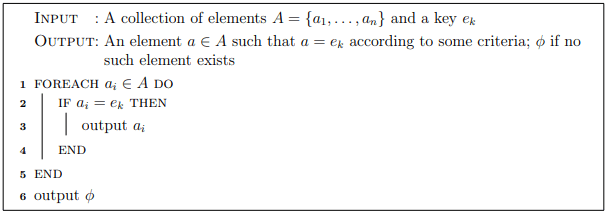
•A basic and straightforward solution to the problem is the linear search algorithm (also known as sequential search).
•Basic idea: iterate over each element in the collection, compare with the key $e_k$
Pseudocode
Example
Consider the array of integers in Table. Walk through the linear search algorithm on this array searching for the following keys: 20, 42, 102, 4.
| index | 0 | 1 | 2 | 3 | 4 | 5 | 6 | 8 | 9 |
|---|---|---|---|---|---|---|---|---|---|
| element | 42 | 4 | 9 | 4 | 102 | 34 | 12 | 2 | 0 |
Analysis
As the name suggests, the complexity of linear search is linear.
- Input: the collection of elements A
- Input size: n as there are n elements
- Elementary Operation: the comparison to the key in line 2
- Best case: we immediately find the element, O(1) comparisons
- Worst case: we don’t find it, or we find it at the last elements, n comparisons, O(n)
- Average case (details omitted): an expected number of comparisons of $\frac{n}{2}∈ O(n)$
Binary Search
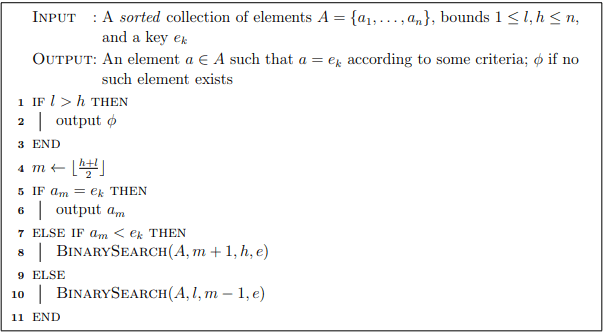
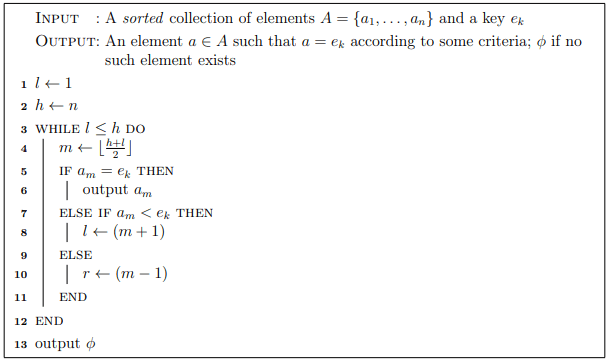
A much more efficient way to search is the binary search algorithm. The basic idea is as follows. Under the assumption that the collection is sorted, we can:
• Examine the middle element:
- If the the middle element is what we are searching for, done
- If the element we are searching for is less than the middle element, it must lie in the lower-half of the list
- Otherwise, it must lie in the upper-half of the list
• In either case: list is cut in half (at least); we can repeat the operation on the sub-list
• We continue until either: we find the element that matches the key, or the sub-list is empty
Pseudocode: Recursive
Pseudocode: Iterative
Example
Consider the array of integers in Table. Walk through the linear search algorithm on this array searching for the following keys: 20, 0, 2000, 4.
| index | 0 | 1 | 2 | 3 | 4 | 5 | 6 | 7 | 8 | 9 | 10 | 11 | 12 | 13 | 14 | 15 |
|---|---|---|---|---|---|---|---|---|---|---|---|---|---|---|---|---|
| element | 0 | 2 | 4 | 4 | 9 | 12 | 20 | 21 | 23 | 32 | 34 | 34 | 42 | 102 | 200 | 1024 |
Analysis
- Input: collection of elements, A
- Input size: n, the number of elements
- Elementary Operation: comparison, performed once for each “middle” element
- Analysis:
• Let C(n) be the (maximum) number of comparisons made by binary search on a collection of size n
• On each recursive call, one comparison is made, plus the number of comparisons on the next recursive call
• The list is cut in half; so the next recursive call made will contribute $C(\frac{n}{2})$
• In total: $C(n)=C(\frac{n}{2})+1$
• By case 2 of the Master Theorem, Binary search is $O(log_n)$ - Another view:
• We begin with a list of size n
• After the first iteration, it is halved: $\frac{n}{2}$
• After the second, it is halved again: $\frac{n}{2^2}$
• After i such iterations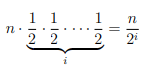
• The algorithm terminates when the list is of size 1 (actually, zero, but we’ll
treat the last iteration separately):$\frac{n}{2^i}=1$
• Solving for i = log n, thus O(log n) iterations
Contrast binary search with linear search: suppose we wanted to search a database with
1 trillion ($10^12$) records
• Linear search: approximately $10^12$ comparisons require
• Binary search: approximately $log_2(10^12) ≈ 40$ comparison
Suppose further that a list initially has n elements and its size is doubled; then
• Linear search: twice as many more comparisons on the new list
• Binary search: $log_2(2n) = log_2(2) + log(n) = log(n) + 1$; that is, only one more
comparison than befor
• Binary search requires an up-front, $O(n log n)$ cost to sort (or less if an order is
maintained
• If only done once, no need to sort, just use linear search
• If repeated, even a small amount, $O(log n)$ searches say, then it pays to sort and
use binary searc
#Searching in Java
Linear Search
1 | /** |
Binary Search
1 | /** |
1 | /** |
Preventing Arithmetic Errors
The lines of code that compute the new mid-index, such as
1 | int middle_index = (high + low)/ 2; |
are prone to arithmetic errors in certain situations in which you are dealing with very large arrays. In particular, if the variables high and low have a sum that exceeds the maximum value that a signed 32-bit integer can hold $(2^3 1 − 1 = 2, 147, 483, 647)$, then overflow will occur before the division by 2, leading to a (potentially) negative number.
One solution would be to use a long integer instead which will prevent overflow as it would be able to handle any size array (which are limited to 32-bit signed integers (actually slightly less when considering the small amount of memory overhead for an object).
Another solution is to use operations that do not introduce this overflow. For example,
$$\frac{l+h}{2}=l+\frac{(h-l)}{2}$$
but the right hand side will not be prone to overflow. Thus the code,
1 | int middle_index = low + (high - low)/ 2; |
would work.
Searching in Java: Doing It Right
In practice, we don’t reinvent the wheel: we don’t write a custom search function for every type and for every sorting order.
Instead we:
- Use standard search functions provided by the language
- Configure using a Comparator rather than Code
• Built-in functions require that the equals() and hashCode() methods are properly
overridden
• Linear search: List.indexOf(Object o)
• Binary Search: int Collections.binarySearch(List list, Object key)
– Searches the specified list for the specified object using the binary search algorithm
– Returns the index at which key appears
– Returns something negative if not found
– Requires that the list contains elements that have a Natural Ordering
• Binary Search: int Collections.binarySearch(List, Object, Comparator)
– Searches the given list for the specified object using the binary search algorithm
– Uses the provided Comparator to determine order (not the equals() method)
• Binary Search with arrays: Arrays.binarySearch(T[] a, T key, Comparator)
Examples
1 | ArrayList < Student > roster = ... |